Term Checks for Any Text
Copy, paste, optimize
Term checks are most beneficial where terminology is actually used. A tool-based check is only effective if it directly supports everyone in the company as they work. It is significantly less efficient if everyone on the team has to proactively look up terms with their company-specific definitions. That’s why we at Lexeri are committed to integrating term checks into target systems, where terminology checks are needed.
Given the growing number of editors and expert systems in companies, it’s not possible to develop a custom integration for every application both quickly and cost-effectively. The copy-and-paste term check now meets the need to be able to check any type of text at any time. At the same time, it aligns with the habits of those in the company who have long been pasting their texts into language models or AI translation tools for optimization and further processing.
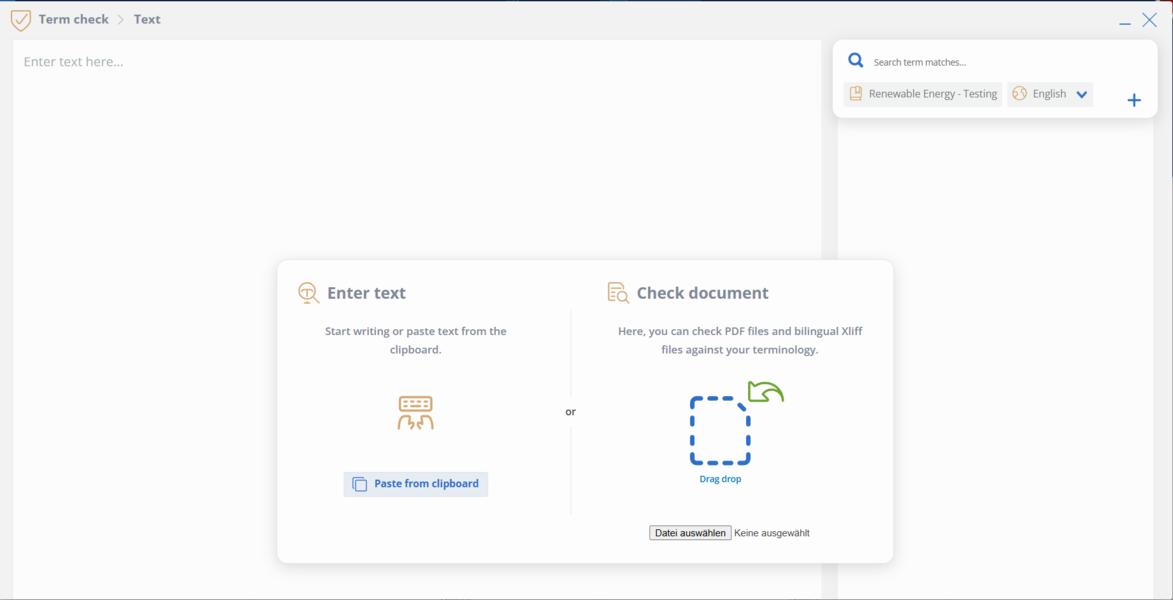
You’ll find step-by-step instructions in our Help Center article:
Why you should use Term Checks via clipboard
Text that never becomes a “document”
Until now, the Lexeri web app has primarily been used to check complete documents such as PDFs (the numerous plug-ins, e.g. in Microsoft Office, are of course an additional resource).
However, a large part of daily communication consists of individual sentences, paragraphs, or short snippets of text: a social media post created from a few bullet points in an internal note, or a chat message from Slack or Teams that is incorporated into a support ticket as a response to a customer. Until now, these texts have (presumably) remained unchecked. As a result, it can happen that a ticket isn’t closed as quickly as expected but instead takes significantly longer to resolve due to a few follow-up questions. This is exactly where our new feature comes in.
Clipboard feature works everywhere
The clipboard is the one interface that every program has. This way, Lexeri’s new feature covers term checks for all applications: the ticketing client for support requests, the ERP system for master data management, and the PIM system for product catalog descriptions.
A single point of contact for everyone
The low threshold ensures that checking becomes a habit. Whether in support, sales, development, or marketing: via the clipboard, colleagues outside of the editorial and translation teams can also use the company’s terminology – and all they need is a single point of contact.
The new feature supports you directly as you draft text: copy, paste, check.
Try it now for yourself: Open the Lexeri web app, paste any text, and run your first term check.