Sneak Peek: Export terminology automatically from Lexeri to Crowdin
If you're responsible for localization, you know the pain: your terminology has been researched, aligned and approved, and then it sits in a folder or a separate system as a file. Meanwhile, the current translation project is working from a version that's three months old. Between the place where terminology is created and the place where it gets applied, there's a gap. And so far, someone has been closing that gap by hand. In Lexeri, automatic exports skip that manual step. New in the lineup: automation from Lexeri to Crowdin.
What is Crowdin?
Crowdin is a platform for localization and translation management. Companies use it to deliver software, apps, websites, technical documentation and marketing content in multiple languages. There’s a particular focus on the development process: through integrations with GitHub, GitLab or Bitbucket, Crowdin pulls source texts in automatically, routes them to translators or to AI pre-translation, and returns the finished files to the same place. For localization managers, that makes the platform the control center where translation jobs, language management, project management with deadlines, controlled use of AI and quality assurance all come together.
Terminology as a glossary in Crowdin
Crowdin's glossary feature lets you embed terms and their agreed translations directly into the translation process. Additional information, such as definitions, images, the relevant subject field and usage status, can be stored as well. A glossary is tied to one or more translation projects and can be imported via TBX, CSV or XLSX.
The key point: the glossary is an excellent recipient for predefined, project-specific terminology, but it doesn't replace a central terminology management system. A glossary can't tell you who signed off on a term from a subject-matter perspective, which variant is explicitly deprecated, how one concept relates to another, or when an entry was last changed. That's exactly where Lexeri comes in.
How Lexeri helps
In Lexeri, terminology takes shape collaboratively before it's put to work in downstream systems. The termbase holds multilingual entries with definitions, images and videos for concepts, usage examples for terms, forbidden variants and the relationships between concepts. New candidates arrive through term extraction from existing texts, during project work, or as a term request from somewhere in the company. Workflows with clear roles define who proposes, who adds target languages and who approves. And with term checks in common authoring environments, the terminology you've built takes effect right where texts are written – providing essential quality assurance in the source language before localization begins.
One thing to point out here: in Lexeri, terminology isn't purely a localization concern. Marketing, technical writing, product management, software development and translation all work on the same pieces of knowledge. Lexeri is the single authoritative source for your corporate language.
That adds up to a clean division of labor: terminology is developed, discussed and approved in Lexeri. Terminology is then applied in Crowdin. Automatic exports are the bridge between the two systems. In Lexeri, Crowdin joins the existing connectors: memoQ and Qterm, RWS Trados Language Cloud and Smartling. Beyond translation and localization systems, automatic exports are also available to Nextcloud and to FTP folders. That way, your current terminology is ready as a reliable data source for your own automations and for external service providers.
Why automatically instead of manually once a month
Current data, without having to think about it: The export runs on an interval you define (daily or weekly, for example) and overwrites the target glossary. What's approved in Lexeri today is available in Crowdin shortly after. Nobody has to set themselves a reminder.
Fewer things to go wrong: Every manual export is the same chain of steps: create the file, select the languages, upload, map the glossary. Manual work is error-prone: an outdated file gets picked, a language gets skipped, or the wrong project gets selected. A configured export runs through every step, every time.
Scale across languages and projects: With 3 languages, manual upkeep is a nuisance. With 15 languages and several projects running in parallel, it becomes a job of its own — and exactly the kind of work that's the first to slide when a product launch is bearing down.
Terminology work becomes visible and usable: When a finished term entry shows up in the translation editor the next day, everyone involved can see that their work is landing. Terminology nobody ever sees eventually stops being maintained.
Try it today
If you're already working in Lexeri, you'll find Crowdin as a target system in automatic exports today. That means Lexeri users can start using the new feature right now, ahead of the official release.
Here you'll find the complete guide to setting up automatic exports to Crowdin:
Crowdin – Set up automatic exports
Do you use Crowdin and want to try the export? Get in touch and we'll help you set it up.
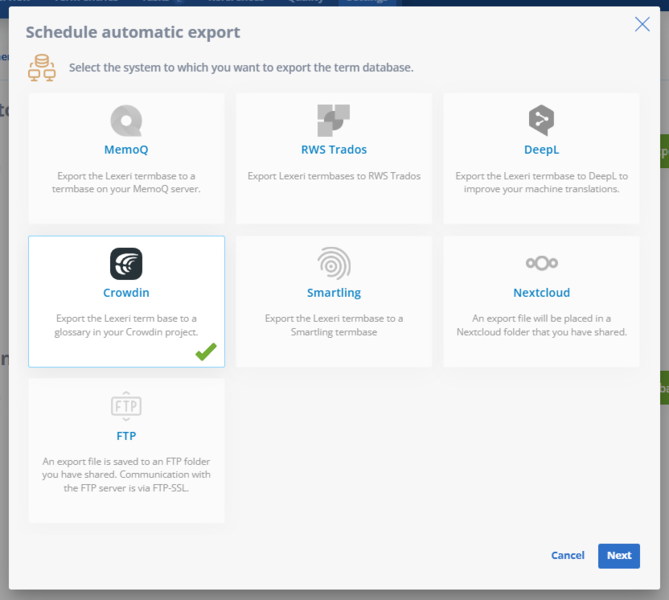
Using the automatic export feature, you can export termbases from Lexeri to a Crowdin glossary with the click of a button.